
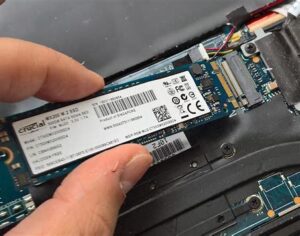
Switching from a traditional hard disk drive (HDD) to a solid-state drive (SSD) can provide a significant performance boost to your computer. Her in CompuNet we follow the following steps when switching your computer to an SSD:
- Compatibility: We make sure that your computer is compatible with an SSD, by checking the specifications of your computer’s motherboard and operating system to see if they support SSDs.
- Choose the right SSD: There are different types of SSDs available, such as SATA SSDs, NVMe SSDs, and M.2 SSDs. We choose the type that is compatible with your computer and meets your needs in terms of capacity and performance.
- Backup your data: Before you switch to an SSD, we make sure to backup all your important data, including documents, photos, videos, and settings.
- Install the SSD: Physically we install the SSD into your computer by following the manufacturer’s instructions. we may need to remove the old HDD and replace it with the new SSD, or you may be able to install the SSD in an additional slot.
- Clone your old drive: We’ll copy the contents of your old HDD to the new SSD. This will ensure that you don’t lose any data or programs.
- Replace the old drive: Once the cloning process is complete, we’ll remove the old HDD and replace it with the new SSD.
Test the SSD: We’ll boot up your computer and check that the SSD is working properly. - With these steps, we’ll guarantee that switching to an SSD will improved performance, and safety.
For further assistance please don’t hesitate to give us a call at +1 832 275 2089. We’re located at 3536 E Broadway St Ste. 104 and we’re open Monday-Saturday from 10am to 6pm.